
In the qubeCLOUD you can activate new products using a license key. There are two ways to do this – depending on whether your organization is already in the qubeCLOUD is registered or not.
1. You are already a SKILLQUBE customer
If your organization already has a qubeCLOUD access, you can activate the license key directly in your existing account.
Important:
You need the role “Device manager” or “Organisations-Administrator”, in order to activate a license key.
Here's how to proceed:
- Register at cloud.skillqube.com an
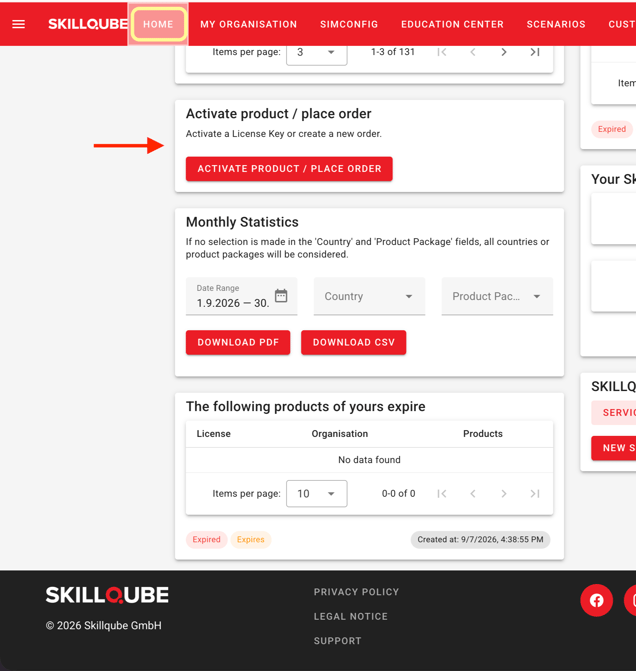
- Select from the navigation menu: HOME
- Click on the tile Activate license key / place order
- Follow the on-screen instructions to activate your product.
2. You are new to qubeCLOUD
If you have not yet had access to qubeCLOUD, you can register with your license key.
Here's how to proceed:
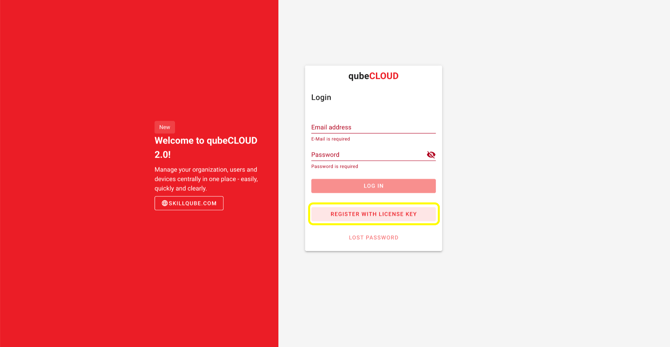
- Open cloud.skillqube.com
- Click on Register with license key
- Enter the license key and follow the subsequent steps to create a new account and activate your device.
Important instructions
- One-time redemption: Each license key can be activated only once.
- License keys are tied to the organization, not to a specific user—even if they have been redeemed by a user.
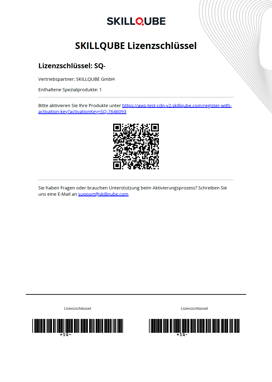
- License key format: Each license key begins with “SQ-” followed by a sequence of numbers (e.g., SQ-123456).
- Account already exists: If your email address already exists in qubeCLOUD, your existing account must have the appropriate permissions (Device Manager or Organization Administrator role) to complete the process.